
Facebook log in to sync applications

STOP “Log in to sync Facebook with your other applications” annoying message!
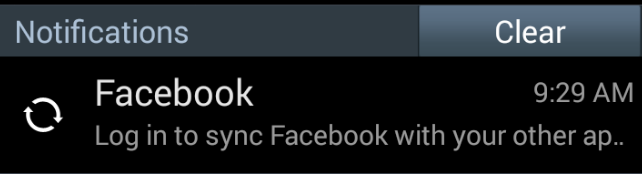
When you start/restart your Samsung Galaxy phone and you see the following notification:
When you tap on the message it directs you to the Facebook page and asking you to login. This is a misleading notification as this message has nothing to do with Facebook app. It’s actually coming from SNS (Social Networking Service) app that is pre-installed on Galaxy phones that Samsung uses it to sync social network information with some other apps.
To disable it follow these steps:
Go to Settings > Application Manger > All
Find SNS app that has Facebook logo and tap on it
STOP “Log in to sync Facebook with your other applications” annoying message!
When you start/restart your Samsung Galaxy phone and you see the following notification:
When you tap on the message it directs you to the Facebook page and asking you to login. This is a misleading notification as this message has nothing to do with Facebook app. It’s actually coming from SNS (Social Networking Service) app that is pre-installed on Galaxy phones that Samsung uses it to sync social network information with some other apps.
To disable it follow these steps:
Go to Settings > Application Manger > All
Find SNS app that has Facebook logo and tap on it