
How do I delete Facebook account completely Right Now? Is it possible to permanently delete your Facebook profile, messages, photos, videos and Facebook friends? Here is a complete way to get rid of your FB account.

Even Facebook don’t want that you should leave Facebook easily. You have tried to deactivate your Facebook account, but this is not the permanent way to come out from Facebook.
What to do before deleting your Facebook account
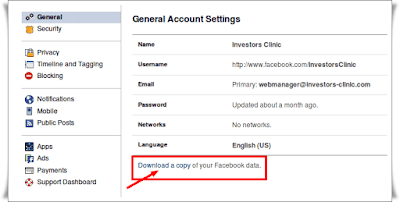
1. Backup your data by moving to drop down menu -> General tab in the left column -> click on “Download a copy”
3. Uninstall any Facebook apps that you use to login to Facebook. It may be that you are logged via Android Mobile, iPhone, or Blackberry. These may unintentionally cause you to remain logged in even after you attempt to delete your Facebook account. While you could also log out from these apps, but the safest measure is to get rid of them entirely.
Below step by step guide lead you to delete Facebook account:
1. Login to your Facebook account and then click below secret delete Facebook account link.
https://www.facebook.com/help/delete_account
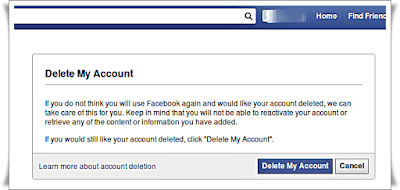
2. Pop up window will appear and then click Delete my account
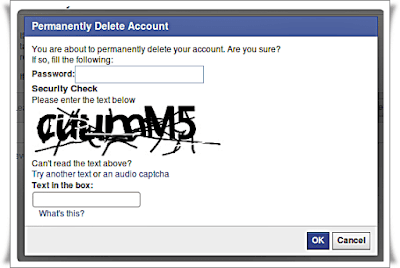
3. Confirm your decision with pop-up window. The pop-up window says “You are about to permanently delete your account. Are you sure?“. Enter password and security check and then click ok
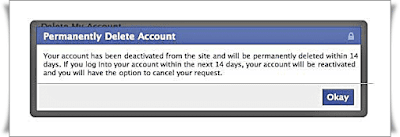
4. After confirming, again new pop-up window appears “Permanently Delete Account“. It says ” Your account has been deactivated from the site and will be permanently deleted within 14 days. If you log into your account within the next 14 days, your account will be reactivated and you will have the option to cancel your request.”
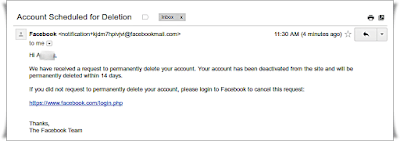
5. Now you would be logged out from your Facebook account. Check your email with the subject “Account Scheduled for Deletion“. In a mail you are requested again to cancel your request to permanently delete your account. It indicates that Facebook still doesn’t want to lose you. If you still want to come again to Facebook world, login with a given link.
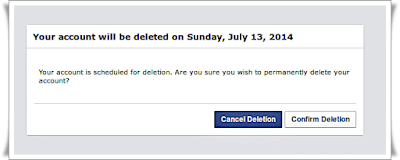
6. When you will log in again, a new pop-up appears. It say to either to “Cancel Deletion” or “Confirm Deletion“. Now again the choice is yours, “Cancel Deletion” if you want to come again or “Confirm Deletion” if you still stick with your decision.
What to do before deleting your Facebook account
1. Backup your data by moving to drop down menu -> General tab in the left column -> click on “Download a copy”
2. Send your friend an e-mail letting them know you will no longer be on Facebook. You can drop a message through Facebook that you are leaving Facebook
Below step by step guide lead you to delete Facebook account:
1. Login to your Facebook account and then click below secret delete Facebook account link.
https://www.facebook.com/help/delete_account
2. Pop up window will appear and then click Delete my account
3. Confirm your decision with pop-up window. The pop-up window says “You are about to permanently delete your account. Are you sure?“. Enter password and security check and then click ok
4. After confirming, again new pop-up window appears “Permanently Delete Account“. It says ” Your account has been deactivated from the site and will be permanently deleted within 14 days. If you log into your account within the next 14 days, your account will be reactivated and you will have the option to cancel your request.”
5. Now you would be logged out from your Facebook account. Check your email with the subject “Account Scheduled for Deletion“. In a mail you are requested again to cancel your request to permanently delete your account. It indicates that Facebook still doesn’t want to lose you. If you still want to come again to Facebook world, login with a given link.
6. When you will log in again, a new pop-up appears. It say to either to “Cancel Deletion” or “Confirm Deletion“. Now again the choice is yours, “Cancel Deletion” if you want to come again or “Confirm Deletion” if you still stick with your decision.
